Services V2 is now live on mobile, delivering a complete booking flow. Choose a location, add multiple services with variants and add ons, apply coupons, respect staff specific pricing and hours, and schedule in a single streamlined checkout. Enhanced filtering shows booked events per service across calendar views, keeping teams fast and accurate on the go.
Multi location booking based on available locations
Service variations with selectable options and pricing
Add ons with quantity support during booking
Coupon code support for promotions and discounts
Staff specific pricing that auto assigns correct staff rates
Date specific staff hours with accurate time slots
Multi service checkout to combine services in one flow
Calendar view filtering to display booked events by selected services
Create common bundles as multi service presets to speed up repeat bookings
Use clear names for variations and add ons so staff can select quickly on mobile
Set staff hours and exceptions ahead of peak periods to avoid manual overrides
Keep coupon names short and memorable for easy entry during checkout
Review calendar filters when your team handles many services to reduce clutter
Test a few end to end bookings per location to verify pricing and time slots
Step 1
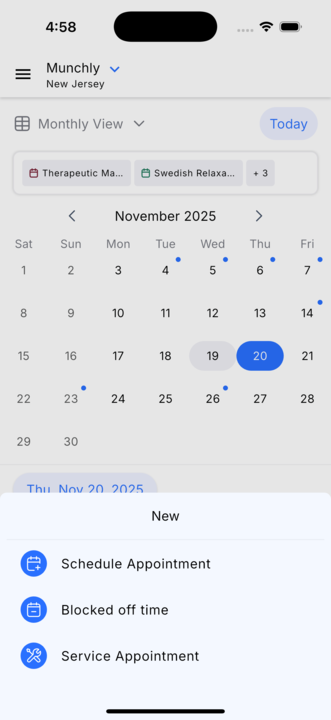
Open Calendars in the mobile app and tap the plus button to start a new service appointment.
Step 2
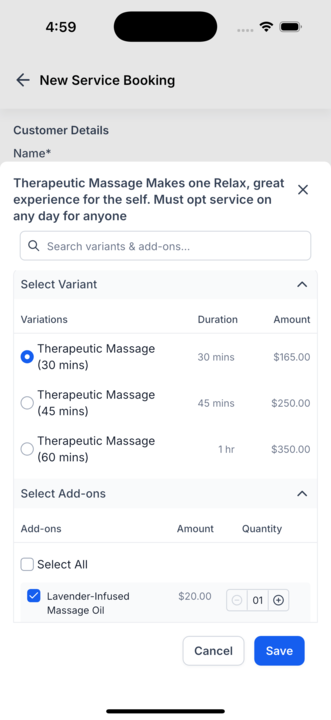
Select the location where the services will be delivered. Add one or more services to the booking flow. Choose service variations and set any required options.
Step 3
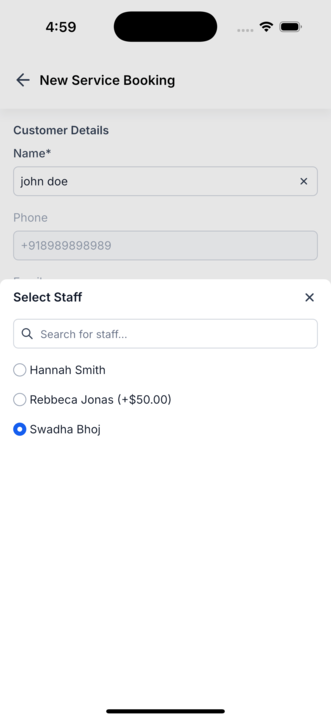
Confirm staff assignment and verify staff-specific pricing is correct.
Step 4
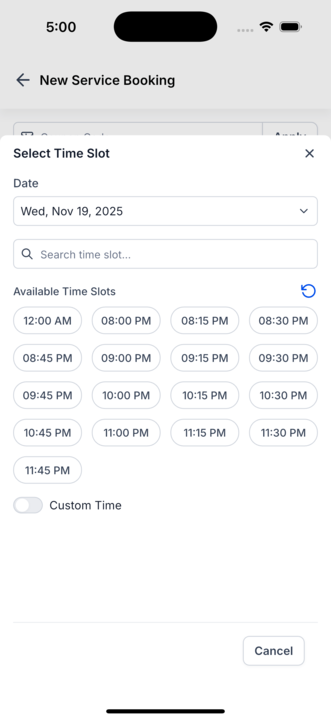
Pick an available time slot based on the selected services or choose a custom time.
What can I include in a single mobile booking?
Multiple services, variations, add ons with quantities, coupons, and a selected time slot across locations.
How does staff-specific pricing work?
The app assigns the appropriate staff and applies the correct rate automatically based on your settings.
Can I filter the calendar by services?
Yes, select multiple services to filter booked events across monthly, weekly, and list views.
How are date-specific hours handled?
Available time slots reflect each staff member’s custom hours or exceptions for the chosen date.
Do coupons apply during mobile checkout?
You can enter a coupon code during booking, and the discount is applied to the appointment.
