You can now copy pipelines from one account to another, saving time when setting up similar sales workflows. This ensures consistency across teams and reduces the need to rebuild pipeline structures manually.
• Ability to duplicate pipelines across accounts
• Faster setup of sales workflows in new environments
• Consistent pipeline structures across teams
• Reduced manual configuration effort
• Improved scalability for managing multiple accounts
• Standardize pipeline stages before duplicating
• Review copied pipelines to ensure accuracy
• Update user assignments after duplication
• Test pipeline functionality in the new account
• Use duplication to maintain consistent sales processes
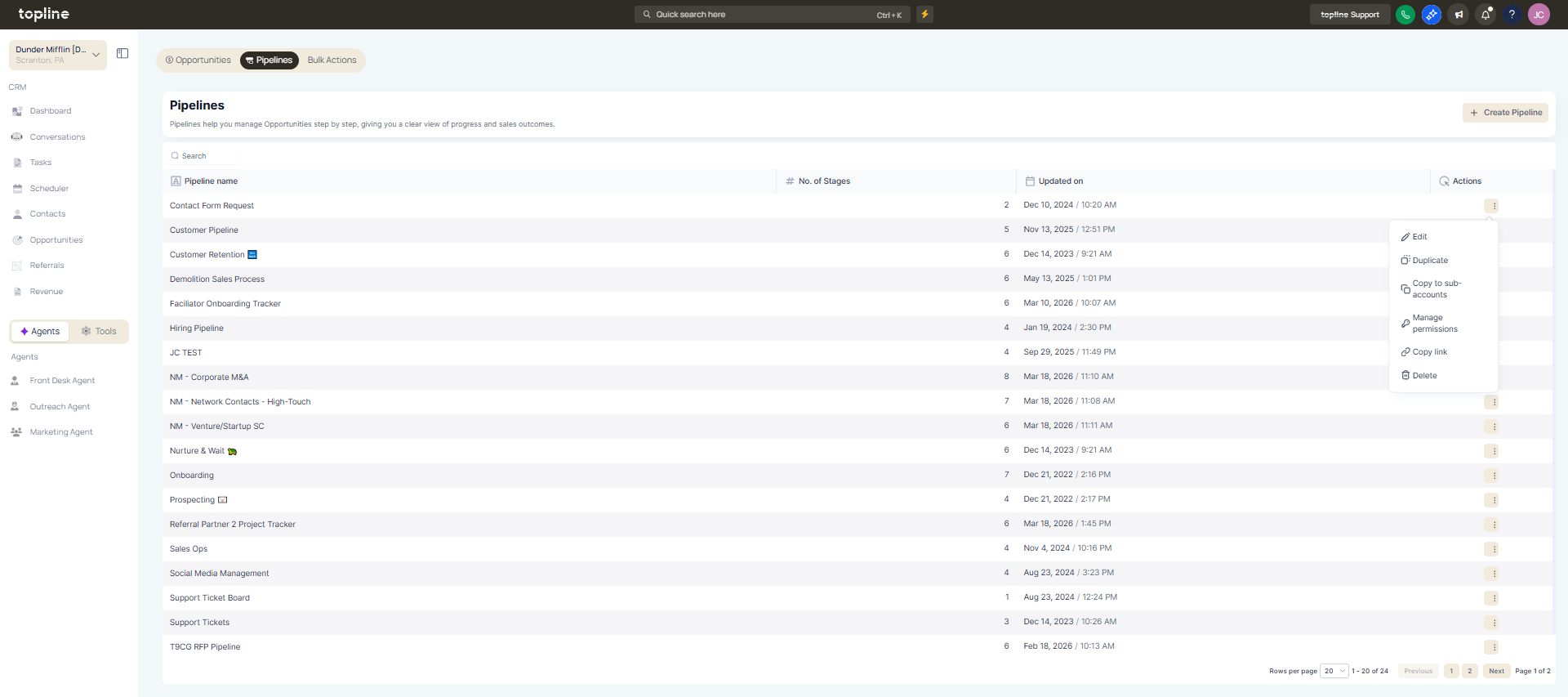
Step 1
Navigate to the pipelines or opportunities area. Choose the pipeline you want to copy.
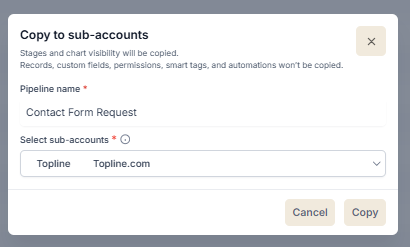
Step 2
Select the option to duplicate the pipeline. Choose the account where the pipeline will be copied.
What does duplicating pipelines across accounts allow?
• It allows copying pipeline structures from one account to another.
Do I need to enable this feature manually?
• No, the duplication option is available within pipeline settings.
Are all pipeline stages copied?
• Yes, stages and structure are duplicated.
Does this copy existing opportunities?
• No, only the pipeline structure is copied.
Can I edit the duplicated pipeline?
• Yes, it can be customized after duplication.
