Coupons can now be applied at the variant level, giving businesses more control over pricing and promotions. This allows discounts to target specific options such as size or color, improving flexibility in promotional strategies and helping optimize sales performance.
• Coupons can be applied to specific product variants
• More precise discount targeting for promotions
• Improved flexibility in pricing strategies
• Better control over product-level discounts
• Enhanced promotional customization
• Use variant coupons to promote specific inventory
• Apply discounts to slow-moving variants
• Test different discount strategies for better performance
• Clearly label discounted variants for customers
• Monitor results to refine promotional campaigns
Step 1
Go to the coupon or discount settings.
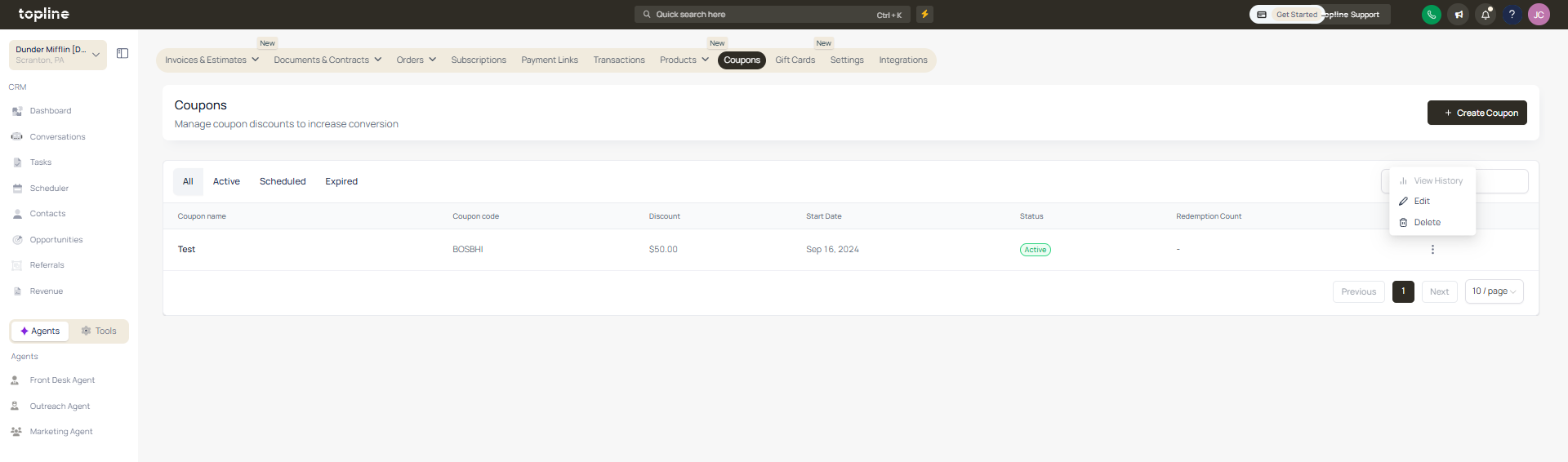
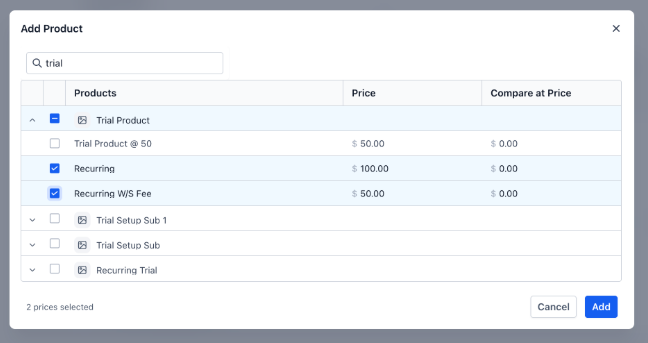
Step 2
Choose the option to apply the coupon to specific variants. Select the variants that should receive the discount.
What are variant-level coupons?
• They are discounts applied to specific product variations instead of the entire product.
Do I need to enable this feature manually?
• Yes, you must configure the coupon to target specific variants.
Can I apply a coupon to multiple variants?
• Yes, multiple variants can be selected.
Does this affect other variants of the same product?
• No, only selected variants receive the discount.
Can this improve promotional strategies?
• Yes, it allows more targeted and flexible discounts.
