
You can now select and manage custom dispositions while working on mobile. This ensures consistent tracking of call outcomes and interaction results, whether you are working from a desktop or on the go, improving reporting accuracy and follow-up actions.
What’s New
• Custom dispositions now supported on mobile
• Ability to select dispositions after calls and interactions
• Consistent disposition options across desktop and mobile
• Improved data tracking for mobile activities
• Better visibility into call outcomes from mobile usage
Tips
• Use dispositions immediately after calls to keep records accurate
• Standardize disposition names for clearer reporting
• Review mobile entries regularly to ensure consistency
• Train team members to apply the correct disposition every time
• Use dispositions to guide follow-up workflows
How to Set It Up
Step 1
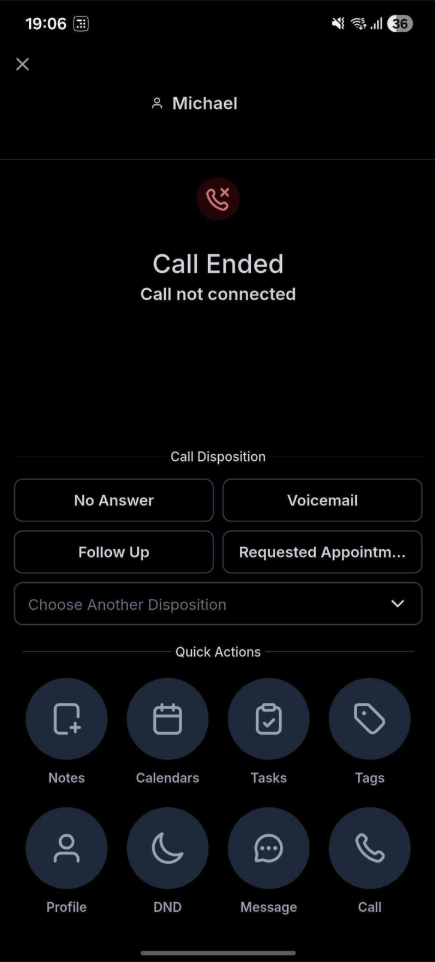
Access your account from a mobile device. Finish a call or activity that requires an outcome selection.
Step 2
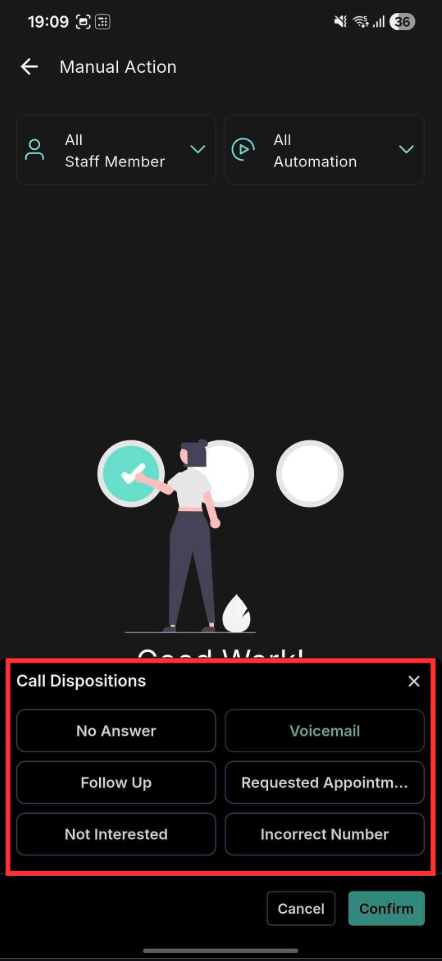
Choose from your available custom dispositions. Confirm the disposition to store it with the activity record.
FAQ’s
What are custom dispositions on mobile?
• They allow you to label and categorize call outcomes directly from mobile.Do mobile dispositions match desktop options?
• Yes, the same custom dispositions are available on both.Do I need to enable this feature?
• No, it is available automatically on mobile.Can dispositions be edited after saving?
• Yes, dispositions can be updated if changes are needed.Are mobile dispositions included in reports?
• Yes, they are tracked the same way as desktop entries.